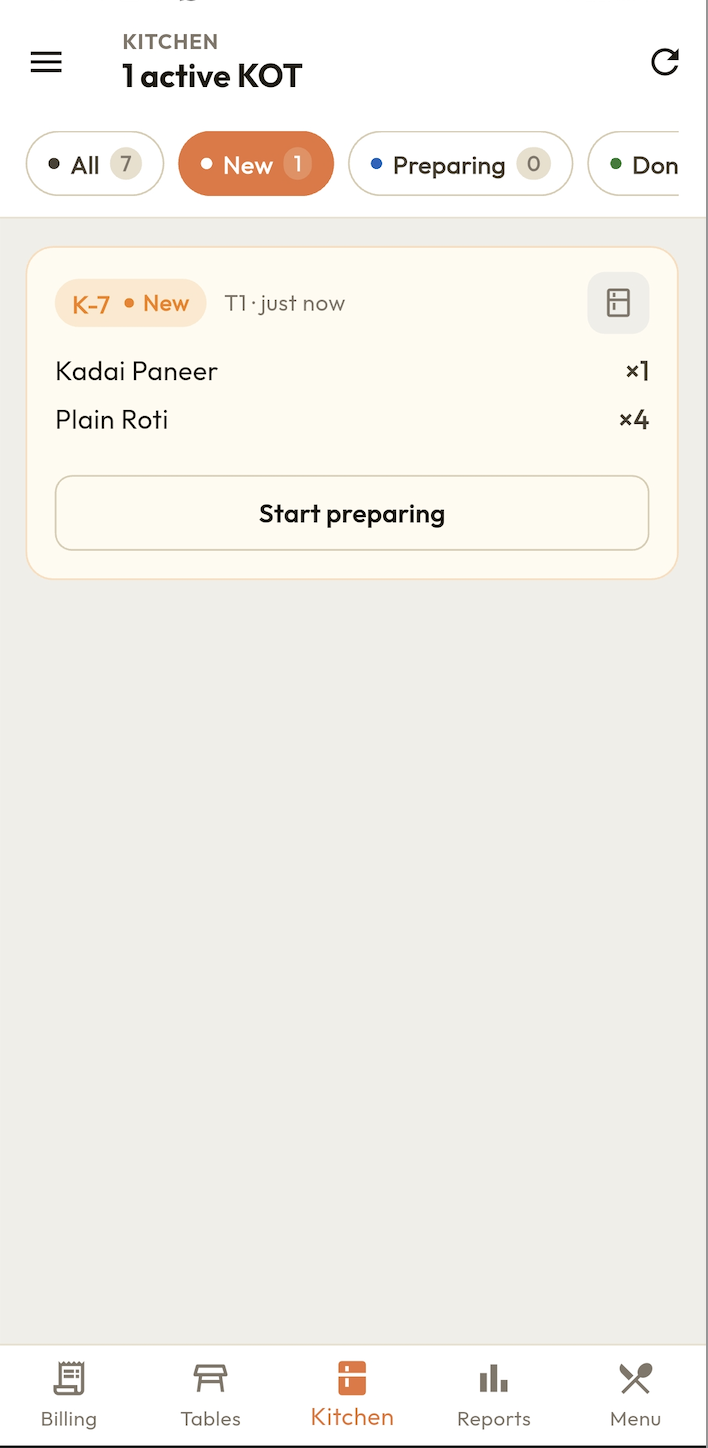
BillKaro sends KOT to your kitchen the moment an order is placed. No paper, no handwriting, no delays. Your kitchen sees orders instantly on screen or printer.
Paper KOT slips get lost in a busy kitchen. Orders get forgotten. Customers wait too long and get frustrated.
Waiters writing fast means chefs can't read the KOT. Wrong items get prepared. Food gets wasted. Customer unhappy.
Waiter walks to kitchen to give slip. Kitchen is busy. Slip waits. Food comes late. Tables turn slower.
Order placed on POS — KOT reaches kitchen instantly. No walking, no paper. Zero delay.
Print KOT on a Bluetooth thermal printer in the kitchen. Table number, items, quantities — clearly printed.
Add or cancel items from an order anytime. Kitchen gets updated KOT immediately.
Manage KOT for multiple tables simultaneously. Each table's order tracked separately.
KOT works even without WiFi. Local kitchen devices stay in sync without internet.
Send KOT for takeaway and delivery orders too. Kitchen always knows what to prepare next.
Waiter selects table, adds items from menu in BillKaro POS app on their Android device.
Tapping "Send KOT" instantly sends the order to the kitchen screen or prints it on the kitchen thermal printer.
Chef reads the digital KOT, prepares the food and marks it done. Waiter serves the food at the table.
KOT stands for Kitchen Order Ticket. It is a slip sent to the kitchen listing the items ordered by a customer at a table. Digital KOT software sends these automatically when an order is placed.
When a waiter adds items to a table order in BillKaro, the KOT is automatically sent to the kitchen device or printed on the kitchen printer. The kitchen sees the order in real time.
Yes. BillKaro can print KOT tickets on a Bluetooth thermal printer in the kitchen. Each KOT shows table number, items and quantity.
Yes. BillKaro allows you to cancel items from a KOT or add new items to an existing order. The kitchen is notified of changes instantly.
Yes. BillKaro KOT works offline. Orders are sent to kitchen locally and sync to cloud when internet is available.
Yes. BillKaro supports KOT for dine-in tables, takeaway counters and delivery orders from the same interface.
KOT is sent to the kitchen when an order is placed so chefs can start cooking. A bill is generated later for the customer to pay. KOT is an internal kitchen document; a bill is a customer receipt.
Digital KOT is more legible than handwritten slips, cannot be lost, and auto-updates when orders change. This reduces kitchen mistakes and improves preparation speed.
Download BillKaro and eliminate paper KOT chaos from your restaurant kitchen today.
Download Free on Android