BillKaro shows you which tables are occupied, free or waiting — in real time. Assign orders, merge tables and split bills from one simple screen on your Android phone.
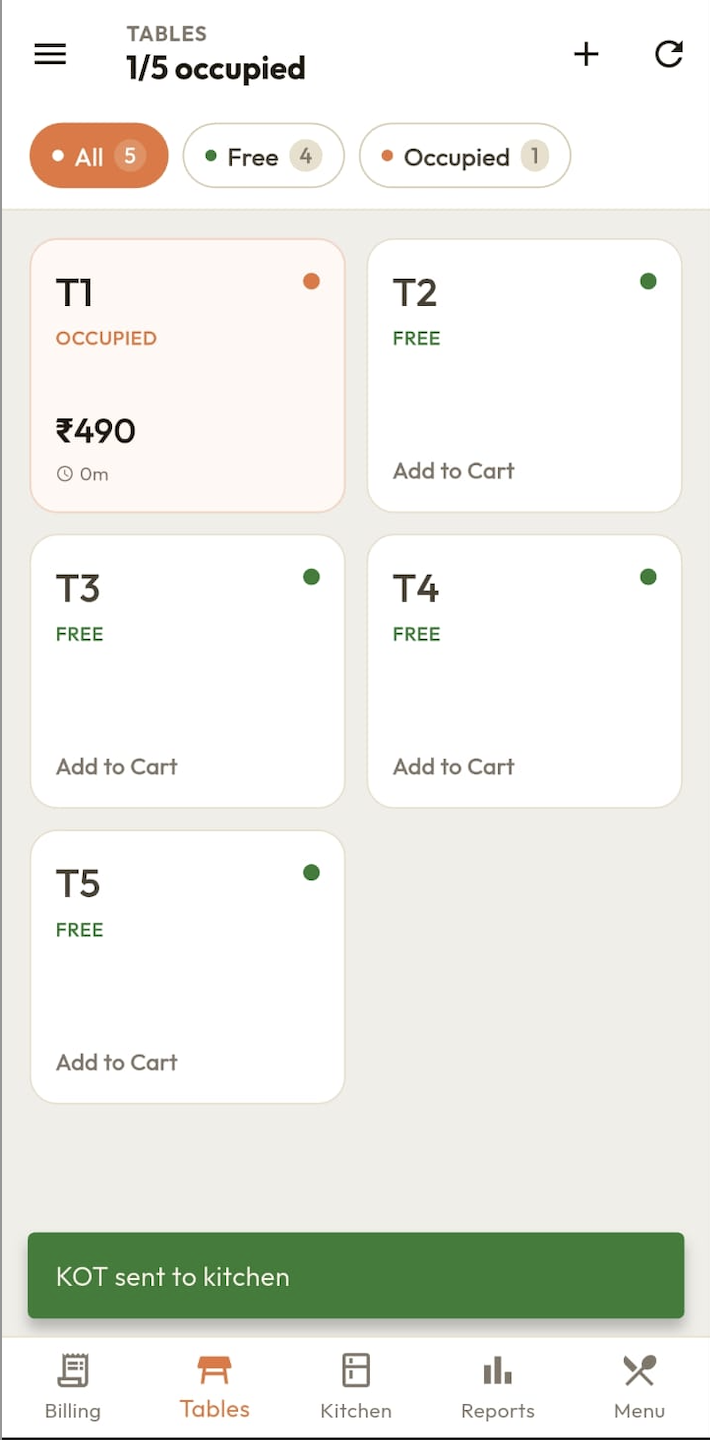
Visual map showing all your tables with live occupied/free status. See your entire restaurant floor at a glance.
Merge orders from multiple tables when a large group arrives. One combined bill for the whole party.
Split bills between customers at the same table. Each person pays only for what they ordered.
See how long each table has been occupied. Manage table turnaround time and serve customers faster.
Name tables as you like — by number, section or position. Terrace, AC Hall, Garden — all supported.
Table management works without internet. Perfect for restaurants where WiFi may be unreliable.
Restaurant table management software lets you create a visual map of all tables, track occupied or free status in real time, assign orders to tables and manage the entire dine-in flow from a single screen.
Yes. You can add and name your tables in BillKaro. Tables can be named by number (Table 1, Table 2) or by section (Terrace, AC Hall, etc.).
Yes. BillKaro supports table merging when customers from different tables sit together. Orders are combined into a single bill.
Yes. BillKaro supports bill splitting so customers at the same table can pay separately for their own items.
Yes. BillKaro shows how long each table has been occupied since the first order was placed, helping you manage turnaround time.
Yes. BillKaro table management works offline. All table orders are saved locally and synced to cloud when internet is available.
You can add unlimited tables in BillKaro. The table map scales automatically to show all your tables on one screen.
Download BillKaro and get full table management for your restaurant in under 10 minutes.
Download Free on Android